Prerequisites
In order to use this guide, I assume you already have:
- A Kubernetes Cluster up and running
- Botkube installed on your cluster
- Slack App for Botkube installed in your workspace
In case you don’t fullfill all of them, please follow the links attached for the setup.
Notifications
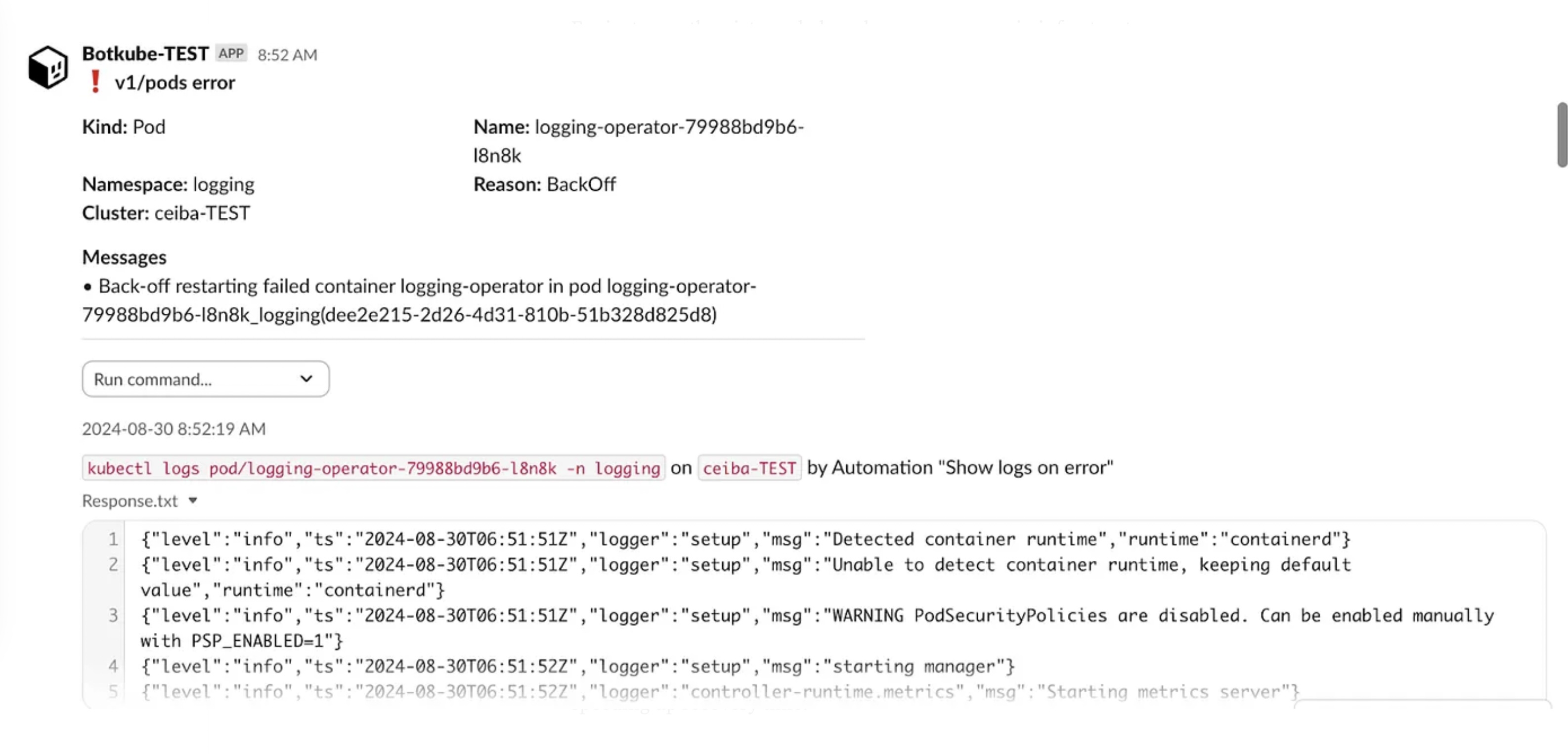
Imagine you’re managing a Kubernetes cluster and want to keep an eye on any errors occurring in your apps. With Botkube, we can get chat notifications about issues detected from Kubernetes events. This approach improves the platform team’s reaction time quite a bit.
In the screenshot below for instance, you can see an error notified on Slack due to an OutOfMemory issue:
Configuration
The configuration can be created in Botkube’s global-config configmap if you are using the default structure. There you can add your event sources.
Since the global configmap could become quite big and needs proper indentation and formatting, I suggest using Kustomize to generate it. It allows the creation of a plain YAML file for Botkube’s config, which can be then used to generate a regular Kubernetes configmap.
Example of the kustomization file needed to generate the configmap from a file called global_config.yaml:
apiVersion: kustomize.config.k8s.io/v1beta1
kind: Kustomization
generatorOptions:
  disableNameSuffixHash: true

configMapGenerator:
  - name: botkube-global-config
    files:
      - global_config.yaml
The following snippet from the global-config configMap shows an event source, which is what we want to notify in our chat based on Kubernetes events. We need to use Botkube’s kubernetes plugin and configure how we want to filter and classify events.
# global_config.yaml
sources:
  platform-team-err:  # name of the source
    displayName: Errors with resources logs
    botkube/kubernetes:  # Botkube plugin
      enabled: true
      context: # RBAC Config
        rbac:
          group:
            prefix: ""
            type: Static
            static:
              values:
                - botkube-src-kubernetes
      config:
        filters:
          objectAnnotationChecker: true
          nodeEventsChecker: true
        event:
          types:
            - error # We want error events
          reason:
            include:
              - .*
        namespaces:
          include:
            - .* # All namespaces
          exclude:
            - kube-.*
        resources: # Which resources do we want?
          - type: v1/pods
          - type: apps/v1/deployments
          - type: apps/v1/statefulsets
          - type: apps/v1/daemonsets
          - type: batch/v1/jobs
In the previous configuration we are interested in events which can be classified as errors from all namespaces except from kube-system. Additionally we define which resources we want to get notifications from, for instance, Pods, Deployments, StatefulSets and DaemonSets.
Botkube Deployment Example
Here you can see the botkube-global-config configmap mounted into our Botkube Pod:
apiVersion: apps/v1
kind: Deployment
metadata:
  name: botkube
spec:
  replicas: 1
  revisionHistoryLimit: 5
  strategy:
    type: Recreate   # WARN: RollingUpdate doesn't work with SocketSlack integration as it requires only a single connection to Slack API at a time.
  selector:
    matchLabels:
      app: botkube
  template:
    metadata:
      labels:
        app: botkube
    spec:
      serviceAccountName: botkube
      securityContext:
        runAsNonRoot: true
        runAsUser: 1001
        runAsGroup: 1001
        fsGroup: 1001
        seccompProfile:
          type: RuntimeDefault

      containers:
        - name: botkube
          image: ghcr.io/kubeshop/botkube:v1.13.0
          imagePullPolicy: IfNotPresent
          envFrom:
            - configMapRef:
                name: botkube-envs
          resources:
            requests:
              cpu: 500m
              memory: 1Gi
            limits:
              cpu: 500m
              memory: 1Gi
          ports:
            - name: metrics
              containerPort: 2112
            - name: lifecycle
              containerPort: 2113
            - name: health
              containerPort: 2114
            - name: webhook
              containerPort: 2115
          readinessProbe:
            httpGet:
              path: /healthz
              port: health
            initialDelaySeconds: 10
            periodSeconds: 10
            timeoutSeconds: 9
            successThreshold: 1
            failureThreshold: 15
          livenessProbe:
            httpGet:
              path: /healthz
              port: health
            initialDelaySeconds: 10
            periodSeconds: 10
            timeoutSeconds: 9
            successThreshold: 1
            failureThreshold: 15
          securityContext:
            privileged: false
            allowPrivilegeEscalation: false
            capabilities:
              drop:
                - ALL
            readOnlyRootFilesystem: true
          volumeMounts:
            - name: startup-config
              mountPath: /startup-config
            - name: config-volume
              mountPath: /config
            - name: cache
              mountPath: /.kube/cache
            - name: cache-volume
              mountPath: /tmp

      volumes:
        # Startup ConfigMap need to be mounted separately to avoid triggering Config Watcher.
        # When using `projected.sources`, each file is removed and added when any ConfigMap/Secret changes.
        - name: startup-config
          configMap:
            name: botkube-startup-config
        - name: config-volume
          projected:
            sources:
              - configMap:
                  name: botkube-global-config
              - secret:
                  name: botkube-communication
              - configMap:
                  name: botkube-runtime-config
        - name: cache
          emptyDir: {}
        - name: cache-volume
          emptyDir: {}
Route Notifications to Slack
The final important piece of configuration is needed to route notifications to our Slack channels. It is configured in a Secret called botkube-communication, which specifies the chat platform, in this case Slack, together with the required credentials for the Slack app and information about the channels.
In this case, we notify in the channel called alerts-platform-team and we bind the event source to the channel.
apiVersion: v1
kind: Secret
metadata:
  name: botkube-communication
stringData:
  comm_config.yaml: |
    communications:
      slack-platform-alerts:
        socketSlack:
          enabled: true
          # APP: Botkube - METHOD: Socket mode
          botToken: some-bot-token
          appToken: some-app-token
          channels:
            alerts-platform-team:
              name: alerts-platform-team
              bindings:
                sources:
                  - platform-team-err